

Are school phone pouch magnets breaking iPhone cameras?
Friday, October 2, 2026 - Comments
Posted by Bristol iPhone Repair
We're seeing more students' iPhones come in with a rear camera that buzzes, rattles and won't hold still. At the same time, more schools are locking phones in magnetic pouches all day and unlocking them on a strong magnet at the gate. This post asks whether the two are connected.
The fault: a camera that buzzes and shakes
You open the Camera app and the picture wobbles as if the phone is being shaken, even when it's flat on a table. There's usually a faint buzzing or rapid clicking from the camera bump. Photos come out blurred and the camera hunts for focus without ever settling.
The front camera is normally fine. So is the ultra-wide (0.5x) lens. That's the giveaway, because neither of those has the part that has failed.
That part is the optical image stabilisation system, or OIS. Inside the main rear camera, the lens floats on tiny springs and is steered by small electromagnets. A gyroscope senses your hand moving and the lens shifts the other way to cancel it out. Sensors inside the module track exactly where the lens is, thousands of times a second.
When those sensors or the suspension stop working properly, the camera loses track of the lens and keeps over-correcting. That frantic correcting is the buzz you hear and the shake you see.
How the pouch lock works, and where the magnet is
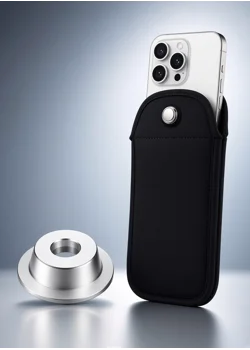
The lockable pouches now used in many secondary schools work like the security tag on a new jacket. A pin snaps into a spring-loaded lock at the top of the pouch and stays there until a strong magnet pulls the catch back.
One detail matters here. The pouch itself contains no magnet. The lock is a spring mechanism, so a phone sitting in a locked pouch all day isn't sitting next to one.
The magnet is in the unlocking base, the round puck fixed to a wall or stand by the school gate. Students tap the top of the pouch on it at the end of the day and the pin releases. The leading maker confirms its bases use magnets and warns that they may interfere with medical devices such as shunts and cardiac devices.
We couldn't find a published strength for these bases. But a magnet that can drag a sprung steel catch open through a plastic housing is likely to be far stronger than anything in a phone case or a wireless charger.
So the exposure is short but repeated: a second or two on a strong magnet, once or twice a day, around 190 school days a year. And the phone is inside the pouch every time.
What Apple says about magnets and cameras
Apple has a support page on exactly this: Magnetic accessories might interfere with iPhone cameras. It explains that the sensors tracking the lens position respond to magnetic fields, and that a magnet placed near them will "interfere with or temporarily disable the sensors".
Apple's advice is to avoid accessories that put magnets, or magnetic metal, near the rear camera. It lists optical image stabilisation on the iPhone 7 and later, and closed-loop autofocus on the iPhone XS and later. In other words, almost every iPhone a student is likely to own.
Note the word "temporarily". Apple describes interference while the magnet is there. It doesn't say a magnet causes lasting damage, and it doesn't say it can't.
Apple does accept that these parts can be worn out by outside forces. A second support page warns that long-term exposure to strong vibration, such as a phone mounted on a motorbike, can degrade the stabilisation and autofocus systems. That is the same fault we see: a camera that buzzes and can't focus.
The newest phones may be more sensitive still. After the iPhone 18 Pro launched last month, a teardown video showed a magnet snapping its new aperture blades shut. That was on a camera module taken out of the phone, so it isn't proof of harm in normal use. It does show how much of a modern camera is moved by magnetism.
So is the unlocking magnet to blame?
Our honest answer: it's plausible, it fits what we're seeing, and nobody has proved it yet. Here is the case each way.
Why we think it could be the magnet
- The mechanism is real. Apple itself says magnets disturb the exact parts that fail.
- The exposure is daily. One strong magnet at the gate, used by every student, every school day.
- The timing fits. Pouches have spread quickly through UK secondaries, and a £60 million national framework for supplying pouches and unlocking bases to schools opened in June 2026.
- iPhone cameras sit at the top of the phone. Slide the phone in bottom-first and the camera ends up at the top of the pouch, right beside the lock that goes on the magnet.
- The maker's own care guide for schools warns that magnets it hasn't issued may damage the device in the pouch. That's an acknowledgement that a strong magnet next to a pouched phone can do harm.
- Some students carry their own. Reports from US schools describe pupils buying powerful magnets online to pop pouches open. Those get waved around the whole pouch, with no care for where the camera is.
Why we can't say for certain
- Apple calls the effect temporary. It has never said a magnet permanently damages a camera.
- We found no published test, and no statement from Apple or a pouch maker, linking unlocking bases to camera failures.
- Magnetic pull drops off sharply with distance. A camera a hand's width from the lock gets a small fraction of the field.
- These cameras fail for other reasons too: drops, age, bike and scooter mounts, and cheap magnetic cases and car holders.
- Students are hard on phones. More broken cameras in that age group could simply be more drops.
- What we have is a pattern in the phones we repair. A pattern isn't proof.
It wouldn't take much to settle. Someone needs to put a gaussmeter where the camera sits in a pouch on a school base and publish the reading. Repairers can help by asking every customer with this fault one question: does your school use a locking pouch? It's a question worth asking.
What students, parents and schools can do
None of this is a reason to fight the phone policy. It costs nothing to keep the camera away from the magnet while the question is open.
Students
- Put the phone in camera-end first. The camera then sits at the bottom of the pouch, as far from the lock as it can get.
- Tap only the lock on the base. Don't rest the whole pouch on it, and lift away as soon as it clicks.
- Don't use your own magnet on a pouch. It's against the rules, and it's the most likely way to put a strong magnet right on the camera.
Parents
- Check the camera now, while it works. Open the Camera app at 1x, hold the phone still and listen. A steady picture and no buzz is your baseline.
- If the fault turns up later, make a note of when it started and whether a pouch was in daily use. That's the evidence nobody has yet.
Schools
- Ask your supplier for the field strength of the unlocking base and for written guidance on phone cameras.
- Show students which way up to load the pouch. It takes one assembly.
- Position bases so only the lock end of the pouch reaches the magnet.
If the camera is already buzzing
- Take off the case and anything magnetic: wallets, grips, ring holders, car mount plates.
- Restart the phone and open the Camera app.
- Compare 1x with 0.5x. If the ultra-wide is steady and the main camera shakes, the stabilisation hardware is the problem, not the software.
- Leave it for an hour away from any magnets and try again. Interference of the kind Apple describes should clear once the magnet is gone.
If it's still buzzing after that, the camera module has failed and needs replacing. No setting or update will bring it back.
Please don't try the internet trick of sticking a magnet to the back of the phone to quieten it. It stops the noise by pinning the lens in place, which is the opposite of a fix.
If the phone is under warranty or AppleCare, speak to Apple first. If it isn't, a rear camera replacement is a routine repair for us. Get in touch and we'll tell you what your model needs.
Camera buzzing or shaking?
Tell us the model and we'll come to you. Lifetime warranty on parts, and no fix, no fee.
Call 07528 654654 WhatsApp us [email protected]Sources
- Apple Support, Magnetic accessories might interfere with iPhone cameras, published 22 January 2024
- Apple Support, Exposure to vibrations may impact iPhone cameras, published 10 November 2023
- Tes, £60m framework to supply phone pouches for schools, 12 June 2026
- Willamette Week, Inside a Portland high school where students' phones are kept under lock and key, October 2024
- UNILAD Tech, Tech expert issues warning to iPhone 18 Pro owners, 22 September 2026
- The leading pouch maker's published FAQ and its care guide for schools
Featured Products
